
Ransomware recovery for SaaS data: why protection isn't complete until recovery is proven


In short: Ransomware protection solutions aren't complete until recovery has been proven to work. That depends on six conditions: preventing the attack, planning for prevention to fail, protecting the recovery copy, finding a clean recovery point, restoring at the right scale, and proving the recovery process actually works.
Ransomware prevention, immutable backups, SaaS backup, restore testing, and air-gapped infrastructure are all well-established parts of the conversation. What's less often explained is how those pieces connect into one coherent answer to a specific, practical question: if ransomware gets through, what actually needs to be true for an organization to recover the data it had stored in Microsoft 365, Google Workspace, Salesforce, or a similar platform?
That's the question this piece works through, stage by stage. Prevention, however good, cannot reduce ransomware risk to zero, so a recovery strategy has to account for what happens when prevention fails. The six conditions below show what needs to be in place for that recovery process to hold up when it's tested for real.
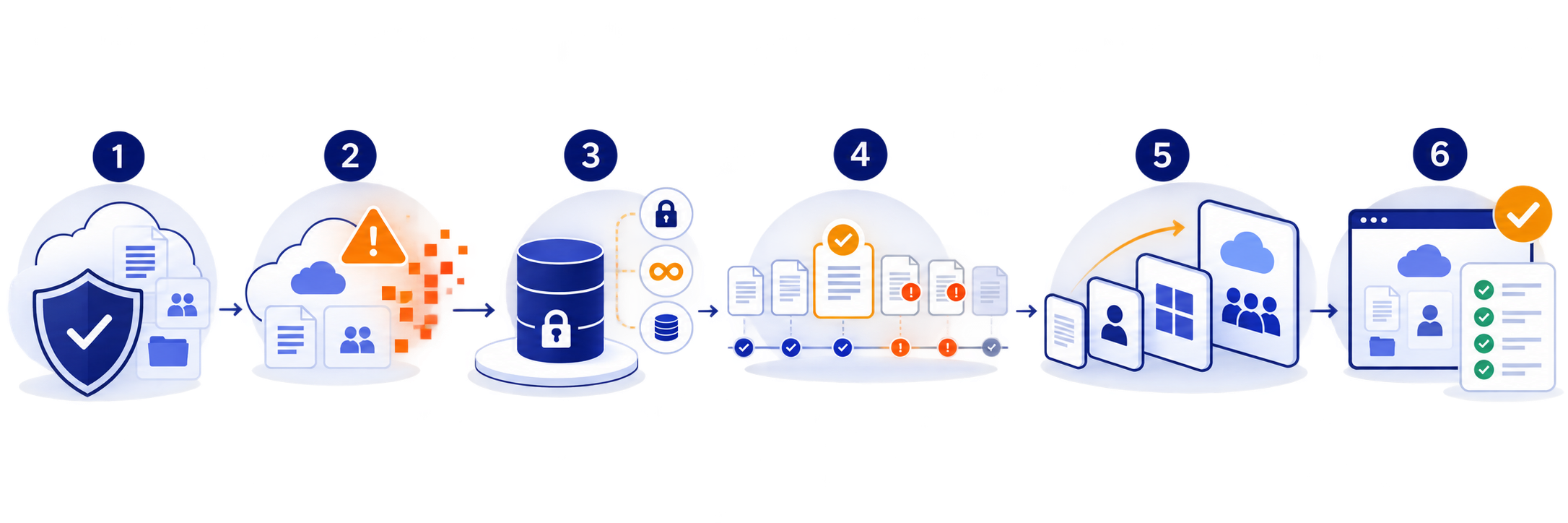
1. Prevent the attack
Ransomware prevention best practices for SaaS environments center on phishing-resistant authentication, least-privilege access, tighter third-party app permissions, and anomaly monitoring, but none of these reduce risk to zero, which is why recovery still matters.
Prevention is still the first layer, and it's worth being specific about what that means for SaaS environments rather than treating it as a given. For accounts that can reach administrative functions, phishing-resistant authentication provides protection against phishing and MFA-fatigue attacks that some other MFA methods do not, which is why CISA recommends phishing-resistant MFA as part of a Zero Trust approach. Least-privilege access, limiting who holds admin rights and for how long, reduces how much damage a single compromised account can do. Reducing unnecessary third-party app and integration permissions closes off a path that doesn't involve a human credential at all. Monitoring for anomalies, not just known attack signatures, can help detect unusual deletion or permission-change patterns before they compound.
All of this reduces the likelihood or potential impact of an incident. None of it eliminates the risk entirely, which is why prevention can't be the entire strategy on its own. That's not a criticism of prevention. It's the reason the next five stages exist.
2. Assume prevention can fail
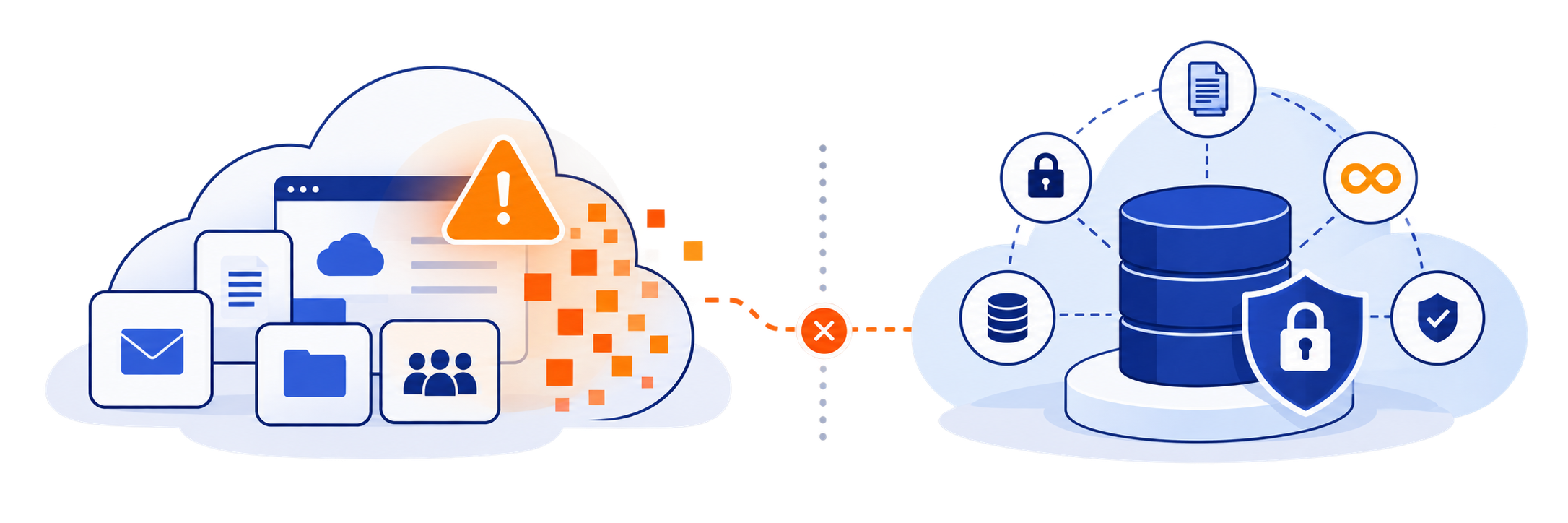
A ransomware-resilient recovery plan assumes that credentials, administrator accounts, or connected integrations will eventually be compromised, and that native platform retention may be altered or exhausted during the same incident.
This is the point where the planning has to change shape. A ransomware-resilient organization plans for the specific possibility that credentials get compromised, that an administrator account gets compromised, that an integration or connected application gets compromised, that an attacker reaches SaaS data directly, and that native retention or recovery mechanisms may also be altered, bypassed, or exhausted during the same incident, depending on the platform and the attacker's level of access.
A Foundry survey commissioned by Keepit, "Can data protection keep pace with the shifting landscape?," found that even among IT decision-makers at companies with 1,000 or more global employees, a defined data protection strategy covers only 70% of financial systems, 48% of CRM systems, and 42% of ERP systems. The finding illustrates how incomplete data protection strategies can leave important business systems outside the scope of a defined recovery plan.
3. Protect the recovery copy
A backup becomes a meaningful ransomware recovery layer when it is independent from production, encrypted and immutable, access-controlled separately, retained for a defined period, monitored for health, and tested for recovery.
This is the stage that determines whether the planning in stage two actually holds up. A backup isn't automatically useful just because it exists. What makes a backup useful under ransomware conditions is a set of properties working together:
- Independence from production: the backup doesn't live inside the same SaaS tenant it protects.
- Encryption and immutability: the protected copy is designed to prevent unauthorized alteration or deletion through compromised source-platform credentials.
- Separate access controls: access to the backup isn't governed solely by the source platform's permission structure.
- Defined retention: historical recovery points remain available for the period the organization actually needs.
- Backup health monitoring: the organization can see whether backups are completing and remaining usable.
- Tested recovery: the organization has demonstrated that it can retrieve and restore the data when needed.
Identity is part of the recovery architecture, not a separate topic
Identity and access configuration must be treated as recoverable data, not just a cybersecurity concern, because a compromised administrator account can interfere with the same backup and retention systems an organization depends on to recover.
This is usually where backup and identity security get treated as two different conversations, and that split can create gaps. If an attacker compromises an administrator or identity account, the consequences aren't limited to the application data behind it. The same access can change permissions, interfere with native retention or backup administration, and potentially interfere with the organization's own ability to carry out a recovery. That makes identity and access configuration part of what has to be recoverable, not a separate cybersecurity concern sitting next to the backup question.
That said, "can I recover my data" and "can I regain trusted control of the environment I need to recover it into" are genuinely different questions, and it's worth keeping them distinct rather than assuming one product capability answers both. Keepit's Entra ID backup service covers identity and configuration objects including users, groups, roles, enterprise applications, Conditional Access policies, Intune policies, BitLocker recovery keys, and activity logs, and can restore supported objects into a secondary tenant. Keepit also provides backup and recovery for Okta, extending the same identity-recovery principle to another identity provider. These capabilities address recovery of identity and configuration state; they don't replace incident-response steps such as revoking compromised sessions, rotating credentials, or determining whether an attacker still has access.
How do you recover from ransomware without backups?
Without a usable recovery copy, recovery options narrow to strain-specific public decryption tools (if one exists), native platform retention windows (if they haven't closed or been purged), or manually reconstructing data from exports, syncs, or local caches, none of which are reliable substitutes for an independent recovery copy.
Everything above only matters if the recovery copy it describes actually exists and survived the incident. When it doesn't, either because no independent backup was ever put in place, or because the one that did exist was reachable and destroyed along with the environment it was meant to protect, the remaining options narrow considerably. A public decryption tool may exist for the specific ransomware strain involved, but its availability depends entirely on the strain and whether security researchers have developed a working decryptor. Native platform retention might still hold a restorable copy if the window hadn't closed and the attacker didn't have the access or time to purge it, which isn't something to plan around. Data that was exported, synced to another system, or cached locally outside the primary platform can offer a partial, manual path back, though reconstructing an environment this way is slow and rarely complete.
At that point, organizations may also face the question of whether to pay the ransom. The FBI advises against it: payment does not guarantee that data will be recovered, and it may embolden attackers, encourage other criminals, or fund illicit activities (FBI). This is why having an independent recovery copy matters: it gives the organization an option that doesn't depend on decryption, surviving native retention windows, or reconstructing data manually. Kept separate from production and protected against unauthorized modification, that copy gives an organization a more controlled alternative to those increasingly uncertain recovery options.
4. Find a clean recovery point
A clean recovery point is a version of the data from before the compromise began, identified by correlating activity logs and version history. Restoring the most recent backup without checking for this can simply restore the incident itself.
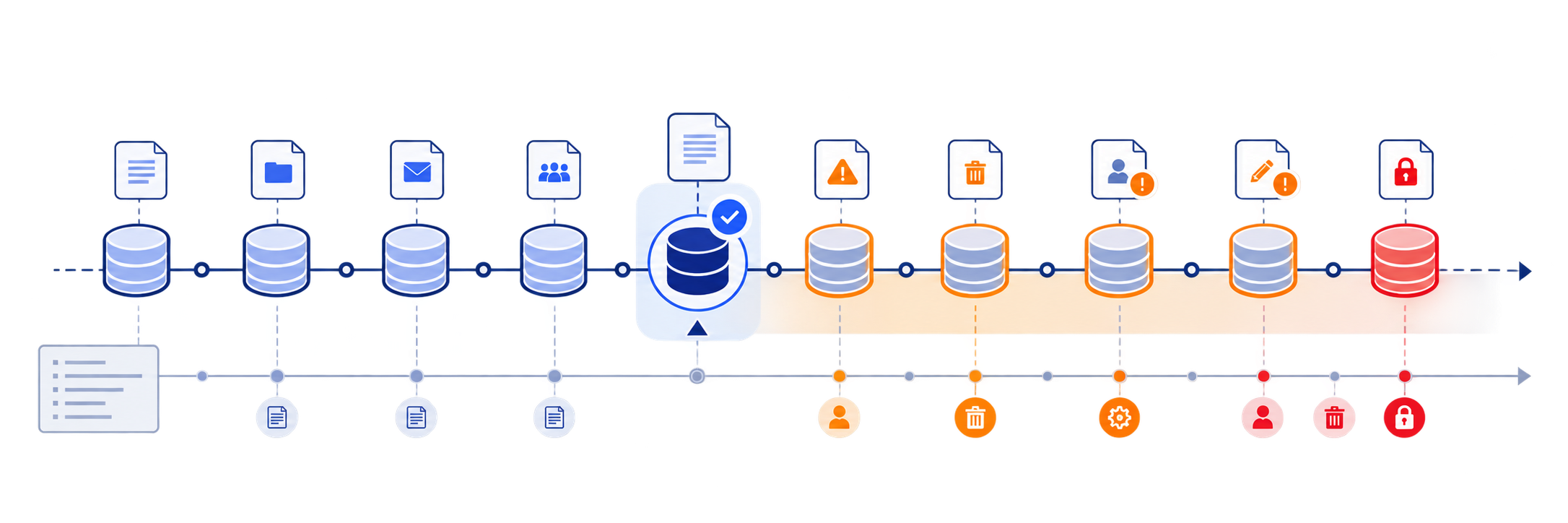
Having a backup and having a known-good recovery point are not the same thing, and the gap between them is one of the places ransomware recovery can go wrong in practice. Ransomware and credential compromises can go undetected for a period of time before anyone notices, which means the most recent backup can already contain encrypted, deleted, or quietly altered data. Restoring from it doesn't undo the incident. It just restores the incident.
This is why historical versions matter beyond a short recovery window: an organization needs the ability to go back to a point before the compromise began, not just to yesterday. Identifying that point usually comes from correlating activity logs and version history to find where the pattern of unusual deletions, permission changes, or encrypted objects actually starts. Retention length directly determines how far back that search can go, and immutability determines whether the version you land on can be trusted once you find it, since an alterable historical copy may not remain a trustworthy recovery point even if it appears clean.
5. Restore at the appropriate scale
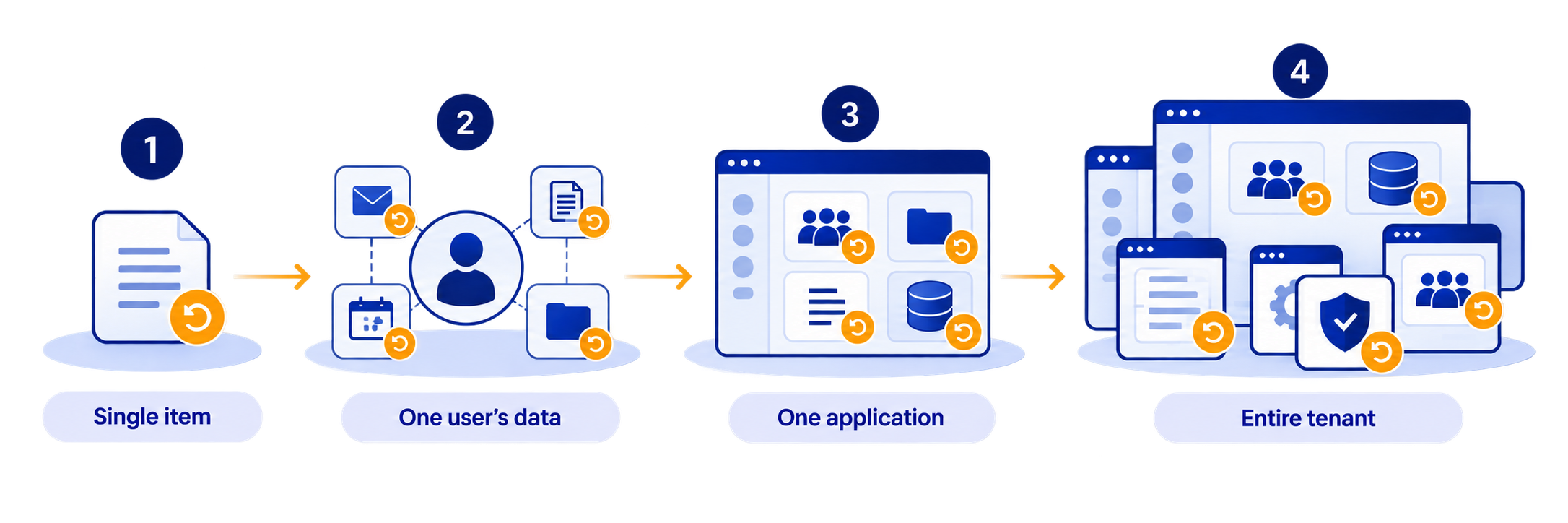
Recovery scale should match incident scope: a single mailbox doesn't need a full-tenant restore, and a tenant-wide compromise can't practically be resolved one item at a time, so the right ransomware recovery solution needs to support both ends of that range.
Recovery requirements change with the scope of the incident, and treating every restore as the same operation is where single-item recovery capabilities can become a limitation. Restoring a single record or file is a different operation from restoring a group of records, a single user's full data, an entire application's dataset, or an entire environment or tenant. An incident limited to one compromised mailbox doesn't need a full-tenant restore. A tenant-wide compromise may not be practical to resolve one item at a time without making recovery itself the bottleneck. The practical principle is to restore only what actually needs to be restored, while having the capability to restore at whatever scale a worse incident would actually require.
6. Prove that recovery works
Recovery is only proven when it's been tested on a defined schedule, the process is documented rather than dependent on one person, the restored data is validated as usable, and actual recovery time has been measured under real conditions.
A backup can exist, pass every health check, and still fail to restore cleanly under real conditions. A permission may not have been accounted for, the process may never have been tested at the required scale, or nobody may have a clear answer about who is responsible for initiating the restore during an actual incident. None of that shows up until someone runs the restore.
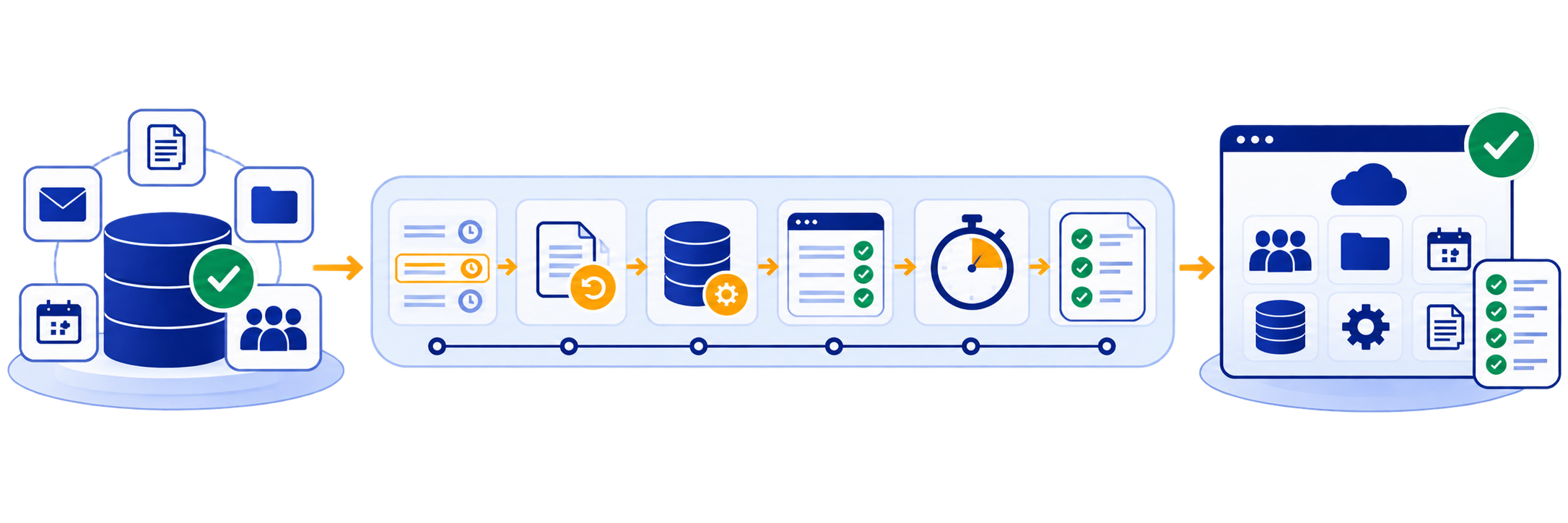
Proving recovery means running that test before an incident forces the question, not during one: restoring on a defined schedule, documenting the steps so they don't depend on one person's memory, validating that the restored data is actually usable rather than just present, and knowing the real recovery time under real conditions rather than an assumed one. A consolidated view of backup health across every connected application, with reporting that can go directly to an auditor or compliance reviewer, turns that proof into something an organization can point to rather than something it has to assert.
What complete SaaS ransomware recovery requires
Recovery isn't a complete ransomware strategy until each part of the chain works together and the recovery process has been demonstrated.
- Prevent the attack: reduce the likelihood that ransomware reaches critical systems and data.
- Assume prevention can fail: build the recovery strategy around the possibility that an attacker gets through.
- Protect the recovery copy: keep backups independent, encrypted, immutable, appropriately retained, and accessible when needed.
- Find a clean recovery point: identify a version of the data that predates the compromise rather than automatically restoring the latest copy.
- Restore at the appropriate scale: recover the specific data, users, configurations, or larger environment affected by the incident.
- Prove that recovery works: test restores, validate the recovered data, document the process, and understand actual recovery requirements.
That is where an independent SaaS backup layer fits into the broader ransomware strategy. Keepit provides backup and recovery for supported SaaS applications, giving organizations an independent recovery layer outside the production environment. Band of Coders can manage the deployment and ongoing administration through our SaaS managed services, alongside broader cloud infrastructure work, or organizations can license Keepit directly and manage it themselves. If it's worth mapping out against your own environment, you can talk to one of our solution architects.
Frequently asked questions (FAQs)
Frequently Asked Questions About SaaS Ransomware Recovery
What's the difference between ransomware protection and ransomware recovery?


How long should SaaS backup data be retained for ransomware recovery?
Who is typically responsible for initiating a SaaS ransomware recovery?
Does immutable backup alone guarantee successful ransomware recovery?
Does paying the ransom guarantee faster recovery of SaaS data?
Related posts
Ransomware recovery for SaaS data: why protection isn't complete until recovery is proven
.png)
Securing the SaaS Sprawl: How We Help You Get Ahead of SaaS and AI Risk
%20(2).png)