
.png)

The Missing Layer in AI Products: UX for Adoption

In many cases, the problem is not the AI model.
It’s the experience around it.
Users need to understand what the system is doing, why it behaves the way it does, and how much they can rely on its outputs. Without that clarity, even powerful AI capabilities remain underused.
This is why user experience plays such an important role in AI systems. Designing AI products is not only about functionality. It is about helping people understand, guide, and collaborate with intelligent systems effectively.
In this article we explore:
- why AI systems behave differently from traditional software
- the role of UX in building trust in AI-driven tools
- design patterns that help users work effectively with AI
- how experience design influences real-world AI adoption
Traditional software is predictable. When users perform an action, they expect a consistent result.
AI systems behave differently. They generate responses based on patterns in data and probabilities rather than fixed rules. This means the same input can sometimes produce different outputs.
For users, this can feel confusing or unreliable.
Good UX helps people understand how the system behaves and what they should expect from it.
Imagine a product team building an AI assistant that helps sales managers summarize customer calls.
The AI can analyze a recorded call and generate a summary with key points and recommended follow-ups. Technically, the system works well.
But the first version of the interface simply shows the summary with no explanation.
Sales managers start asking questions:
Why did it highlight that issue?
Did it miss something important?
How confident is the AI about this recommendation?
Because the system does not explain its reasoning or allow users to review the call segments it used, managers hesitate to rely on the output.
Now imagine a slightly different design.
The summary shows the key points, but it also includes:
- timestamps linking to the exact parts of the call the AI referenced
- confidence indicators showing how certain the AI is about each insight
- the ability to adjust or refine the summary
The AI model is the same.
But the experience is different.
In the second version, users understand the system better and feel more comfortable trusting it.
That difference is UX.
Design patterns that support this approach include:
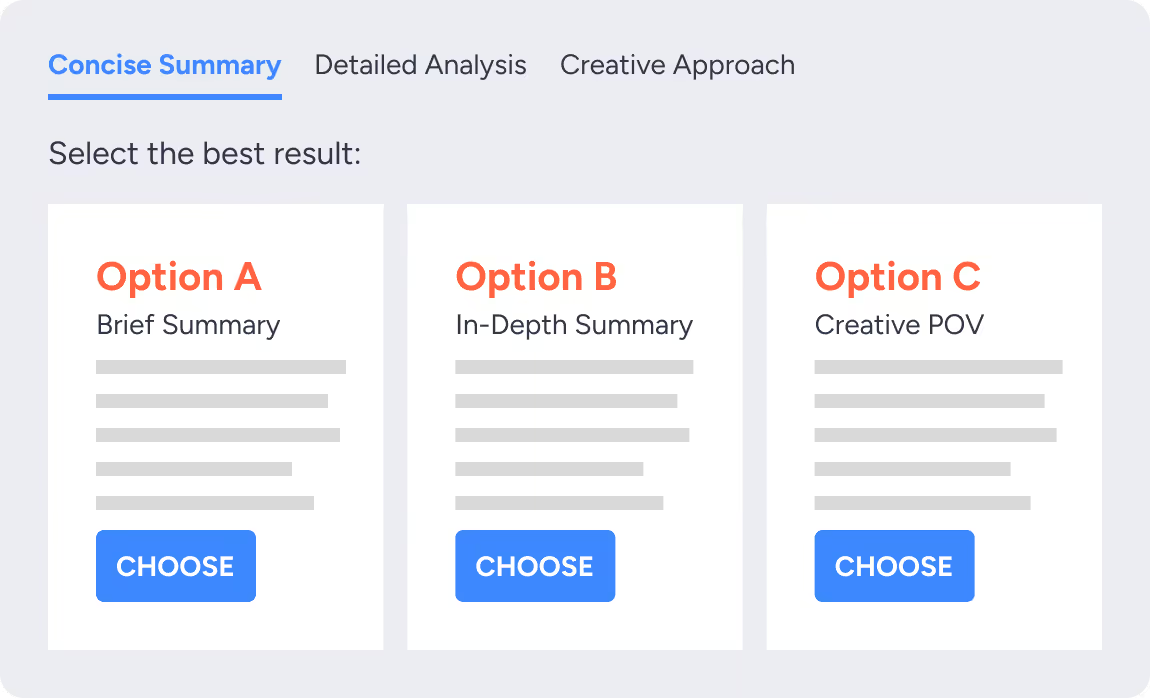
Instead of showing a single AI-generated answer, the interface might:
- Present 2–3 variations with different tones or approaches (e.g., short summary vs detailed summary)
To support refinement, users can:
- Edit inputs or prompts and immediately see updated outputs
- Regenerate only a specific section instead of the entire result
For actions, the system can:
- Preview what will happen before applying a change (e.g., showing how a summary will be updated before saving)
And for control, users can:
- Adjust how much the AI influences the outcome (e.g., more creative vs more strict outputs)
These patterns are typically implemented using structured prompt layers, retrieval systems that connect outputs to source data, and interface components that expose intermediate steps in the AI process.
In our work with teams, designing AI experiences is rarely a linear process. It is iterative, exploratory, and closely tied to how the system is actually built.
We often start by rapidly prototyping workflows using tools like Figma alongside AI-assisted design environments. In some cases, we begin with a simple prompt or concept to generate an initial structure for the interface.
But that output is only a starting point.
From there, the work becomes more intentional. We refine the experience by:
- restructuring layouts to match real user workflows
- connecting interface elements to actual data sources and APIs
- shaping how AI outputs are presented, explained, and controlled
- validating whether the experience aligns with how teams actually make decisions
In parallel, we often build functional prototypes that go beyond static designs.
For example, we’ve explored building full systems such as marketplace platforms with:
- admin dashboards for managing users, stores, and permissions
- plugin systems for integrating analytics, payments, or third-party tools
- real-time inventory and order management workflows
- configurable APIs that allow the frontend to evolve independently
Even when working with mock data, these systems are fully functional.
The goal is not just to design screens, but to understand how AI behaves within a real product environment and how users interact with it over time.
What we consistently see is that AI can generate impressive outputs quickly. But without a clear experience layer, those systems become difficult to navigate, harder to trust, and ultimately underused.
That is where UX becomes critical. It turns technical capability into something people can actually work with.
This is often the difference between an AI feature that looks impressive in a demo and one that becomes part of a team’s daily workflow.
.avif)
.avif)
.avif)
Even well-designed AI features can fail if they interrupt existing workflows.
Some AI tools require users to switch environments, learn new interfaces, or repeatedly rewrite prompts. This creates friction and slows down work.
Successful AI products integrate directly into the environments where work already happens.
For example:
- AI suggestions inside existing dashboards
- recommendations that appear during content creation
- automated insights surfaced at the moment decisions are made
When AI fits naturally into existing workflows, adoption becomes much easier.
Users do not feel like they are learning a new system. The system simply becomes more capable.
Design patterns that support this approach include:
Instead of showing a single AI-generated answer, the interface might:
- Present 2–3 variations with different tones or approaches (e.g., short summary vs detailed summary)
To support refinement, users can:
- Edit inputs or prompts and immediately see updated outputs
- Regenerate only a specific section instead of the entire result
For actions, the system can:
- Preview what will happen before applying a change (e.g., showing how a summary will be updated before saving)
And for control, users can:
- Adjust how much the AI influences the outcome (e.g., more creative vs more strict outputs)
These patterns are typically implemented using structured prompt layers, retrieval systems that connect outputs to source data, and interface components that expose intermediate steps in the AI process.
Start With a Short Working Session
Meet the Band of Coders Community